Trick To Update Airtel Digital TV Software Manually How To

New update of Airtel Digital TV software includes the new Stylish User Interface.
How to Update Manually ?

HOW TO UPDATE ADTV STB SOFTWARE MANUALLY:
- First switch on your TV. Then your Digital TV set top box.It should be strictly followed. First TV. Then STB.
- Now you will see a notification on the TV Screen as like "Please wait Initializing.."
- Dont wait now. Immediately press exit button on ADTV remote twice.
- Now press 2465 immediately from our ADTV Remote controller.
- Then Downloading process will start.
The screen shots are given below for Reference.....

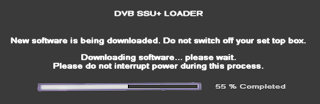
Note: Dont cut the power supply during Downloading process. It will harm your STB.